Doorpass
Turning a founder's smart-lock idea into a trust system for real estate access.
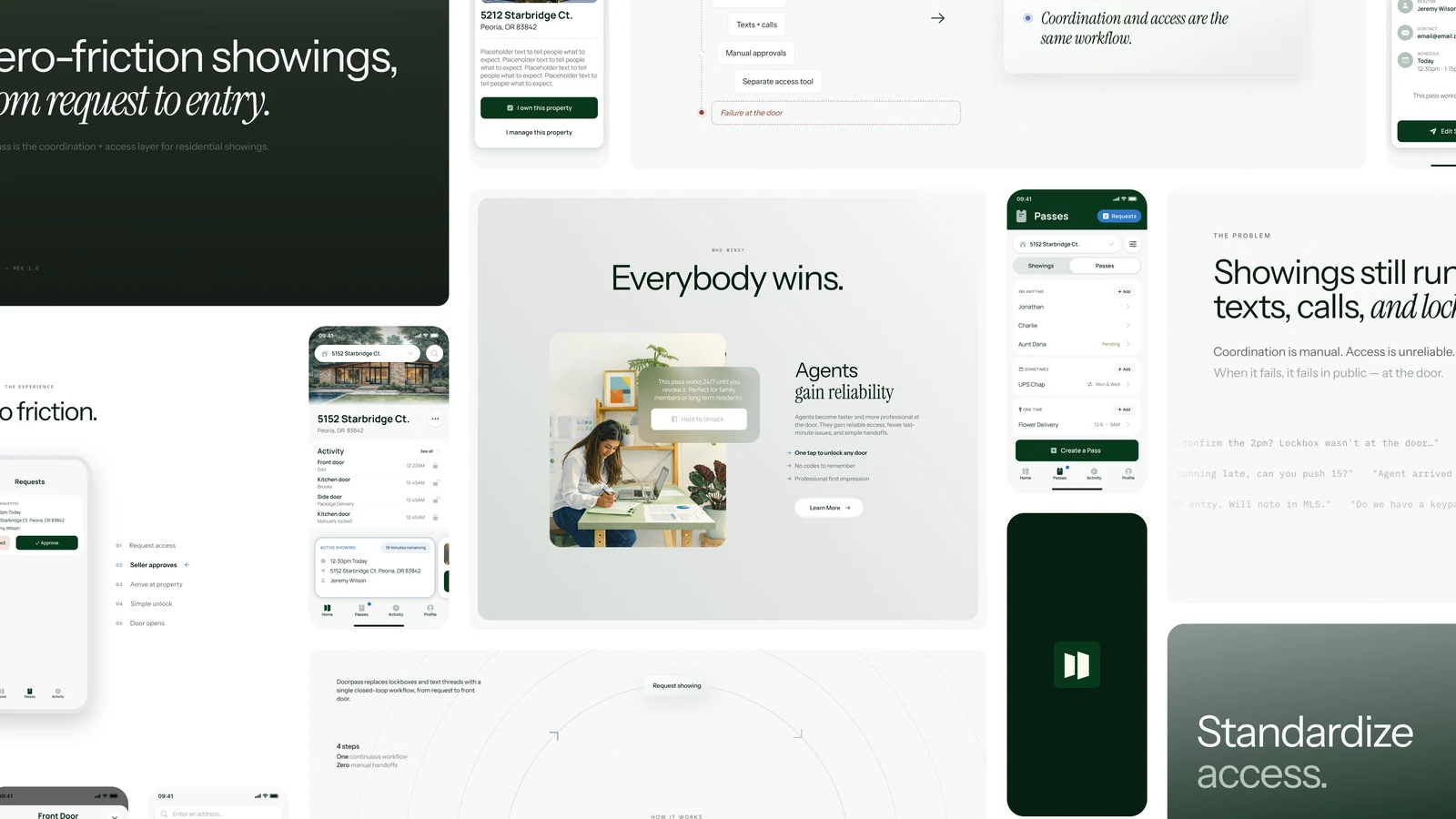
Real estate access is one of those problems that looks boring until you stand close to it.
Then you realize an entire industry has normalized an absurd amount of friction because the old way is just how it's always been done.
Our product had to make the unlock trustworthy. A seller needed to feel safe letting someone into their home. A listing agent needed fewer interruptions and fewer access problems. A buyer's agent needed to get through the front door without a comedy routine in front of clients. And a brokerage needed visibility, standardization, and a record of what happened.
The unlock was simple. The trust system around it wasn't. Nearly everything I did at Doorpass was some version of designing that system and making it legible.
02
The problem was the handoff
Residential real estate access still depends on a strange little ritual: hide a key near the house, let authorized people find it, and hope the system around it holds. It holds until it doesn't. The lockbox is in the wrong place, the code fails, the agent can't get a signal, and the seller never has a useful sense of who entered the home or when. Meanwhile a buyer's agent is standing at the door with clients behind them, negotiating with a piece of aging access infrastructure.
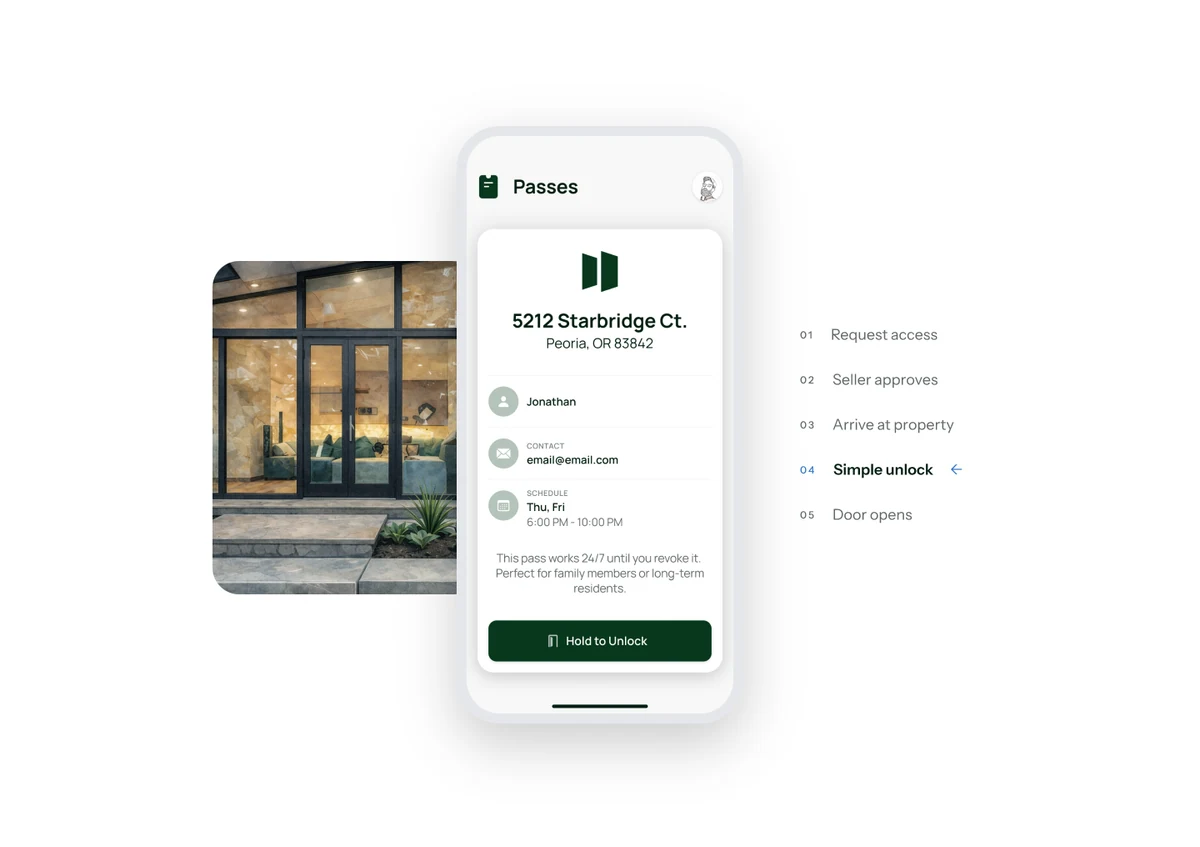
Doorpass treats the showing differently. Instead of access as a shared secret, access becomes a permissioned event: someone requests it, someone approves it, the agent arrives, the door unlocks, and the system records what happened. That shift changed the design problem: the work became designing a clean handoff between people who don't know or trust each other.
03
Two days to find the product
In January 2025 I flew to Louisville for a two-day product workshop with the founder and the CTO I'd recruited. The goal was to leave with the first version of the product: what Doorpass would be first, who it served, what had to work in the first pilot, and which tempting ideas we weren't going to build yet. Having the CTO in the room meant feasibility shaped the product strategy from the first sketch.
The opportunity space was broad: transactions, seller safety, agent coordination, showing access, brokerage compliance, hardware installation, payments, scheduling, and eventually a larger access platform. Too broad. A nice way to make a deck, a terrible way to ship. The important move was narrowing the wedge. We focused on the access moment because that's where the pain was immediate, repeated, and easy for agents to recognize. If Doorpass could make showings easier, safer, and more transparent, the product had a reason to exist before any grand platform story.
By the end of the workshop we had the first shape of the app: how properties get created, how locks get installed, how access gets requested and approved, how an agent unlocks the door, and how activity gets recorded. That workshop became the spine of everything we built afterward.
04
The property became the center
The hardest part of Doorpass was the permission model around the unlock. Who's allowed in, who approved them, and for how long? What happens when a showing changes, when access needs to be revoked, or when someone is standing at the door on a bad connection? Those questions shaped the app more than the lock did.
All four parties from that first list needed the same app to make sense, without it becoming four different products. So I made the property the center of the system.
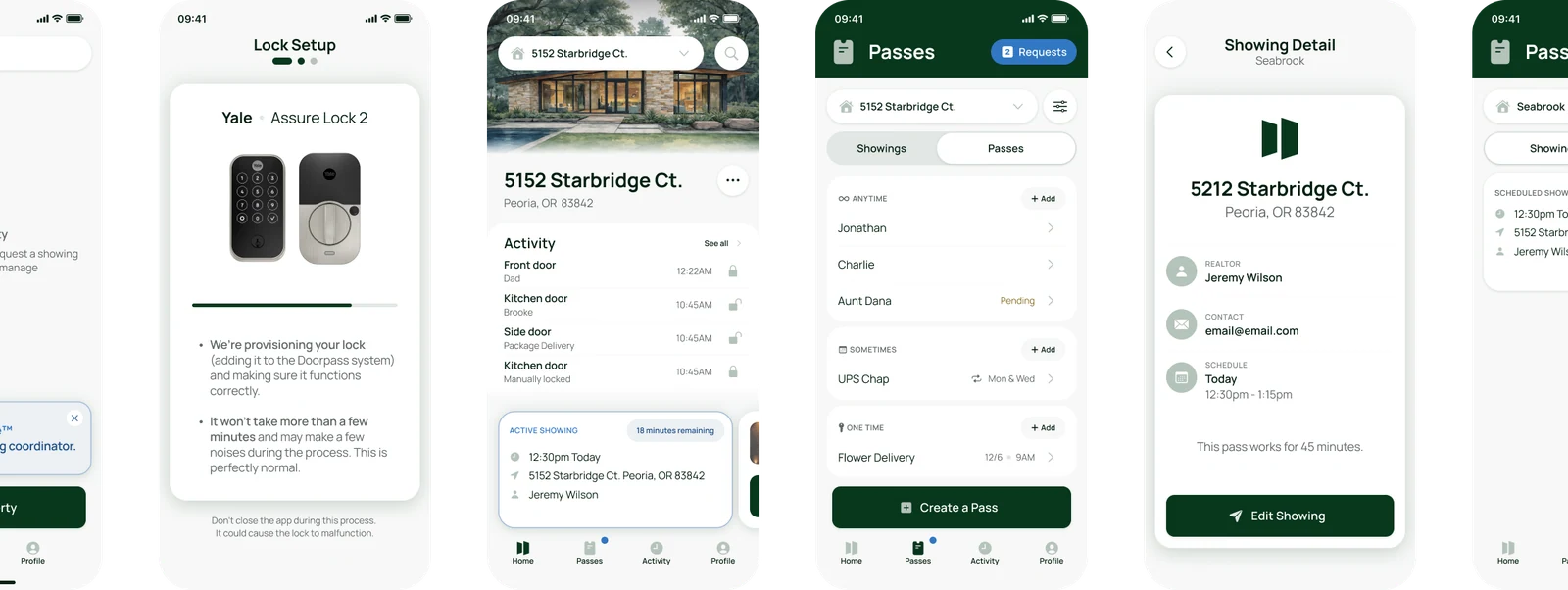
The obvious version of the app asks people what they are during onboarding: homeowner, listing agent, buyer's agent. Clean on a whiteboard, wrong in real life. The same person can be a homeowner on one property, a listing agent on another, and a guest somewhere else, and a spouse, contractor, or assistant may need access without identifying with any industry role at all. So onboarding got simpler: create a profile, add or claim a property, and let the property determine what's available. Once roles lived on properties, the app could ask one question: what can this person do here?
The model also got narrower as it got clearer. One early version treated the app more like a general real estate tool, with more of the surrounding transaction visible in the interface. As the product sharpened, I pulled the app back toward the access moment: property, lock, access, activity. That made the system easier to explain and easier to pilot.
05
Confidence at the door
At the door, the product shouldn't feel clever. An agent has already scheduled the showing, driven to the property, and walked up the path with clients behind them. That's the moment for confidence.
So I designed the app through several iterations around one principle: handle the complexity earlier so the door moment can be calm. The access should be unambiguous, the unlock action obvious, the feedback immediate. Security has to be present without becoming airport theater. Access is bound to the right person and device, the app confirms at the door, and everything gets logged, but the user-facing moment stays simple: yes, this is the property; yes, I have access; yes, the lock is responding. The best version of that screen is reassuring rather than impressive.
Doorpass is app-enabled hardware, which means the clean product diagram eventually runs into real doors, real locks, real phones, and real agents in a hurry. There's a specific humility required in hardware-adjacent software: a flow can look perfect in Figma and still lose to a sleeping lock, a dead spot, or a homeowner who doesn't want a science project attached to their house. So installation, lock state, connectivity, and recovery were treated as core product problems, and the app had to support setup, access, and recovery as thoroughly as the happy path.
06
Designing the public story
I designed and built doorpass.ai end to end: content, information architecture, layout, visual design, development, and the refined brand expression. The site's job was to make a normalized pain visible again. Agents already know lockbox pain, and sellers already feel the strangeness of leaving home access in a box outside; the site had to turn those familiar annoyances into a product argument. The brand also had to catch up with the product. The original identity gave us a starting point, and I refined the expression as the app took shape so Doorpass read as the thing we were actually building: secure, modern, restrained.
The same product story carried into the pitch and pilot materials, but the website is the cleaner artifact: it works when the founder isn't in the room.
07
What shipped
By June 2026, the Doorpass iOS app was live in the App Store and working end to end: claim a property, install a lock, grant access, and operate the lock. I designed the product and the app; our CTO built it. The website is live, and the product is preparing for pilots with real estate teams.
The important part is that the pieces tell the same story. The app, the website, the access model, and the brand all point at the same idea: Doorpass turns home access from a shared secret into a permissioned event.
08
What this is, underneath the app
Take away the smart lock and the real estate category, and what's left is one simple action with a complicated system underneath it. The user doesn't care about the permission model, device binding, lock state, or audit trail. They care that the door opens when it should, stays shut when it shouldn't, and leaves the right people confident about what happened. The lock, the app, the site, and the pitch all exist in service of that. The product is the trust system that makes the unlock feel safe.
More work
Simile Turning design intent into product behavior a team can build from.

Pearson Futures Helping Pearson turn student uncertainty into a platform students could use, partners could join, and the company could keep building.
If you're working on something with this shape, see how I work with teams or email me at drew@drewlittrell.com.
Related writing
Part 2 What AI Makes Buildable Cheap intelligence does not just automate tasks. It changes which organizations and systems are feasible.
Part 1 The Transition Is Not the Destination AI is a general-purpose coordination technology. When coordination becomes cheap, the structures built around expensive coordination begin to wobble.